

Editor’s note
Last week in Part 1, we stripped the agent harness back to its ReAct loop and left it walking in rather expensive circles.
This week, we give it a plan. Part 2 looks at how write_todos, a quick briefing and well-timed nudges add strategy without changing the loop underneath.
Turns out, even sophisticated agents benefit from writing things down and being reminded to look at what they wrote.
Throw a complex question at pure multi-turn ReAct, and a structural flaw shows up — the model walks step by step with no global view. Hit it with a research question that needs five or six angles assembled together, and it’ll grab the most obvious two or three in the first few steps and call it done. It doesn’t even know which angles it skipped.
The fix is crude but effective: make it write the plan down first, then execute.
A new tool: write_todos
In the Deep Research harness, we add one new tool: write_todos. It does nothing! It literally just writes a TODO list into the agent’s state. The flip switch is one line in the system prompt:
<agent name=”Tara”>
You’re a helpful agent.
</agent>
<task>
Your task is to use the given tools to solve the user’s problem.
Use `write_todos` to make a plan and break down tasks.
</task>
<notes>
- Parallel tool calling is supported.
- If you are unfamiliar with a topic, you can use a one-time `web_search` to get a general understanding of it before planning.
- Don’t forget to update todos using `write_todos` after each task is done.
</notes>
Look at the line inside <task>: Use \write_todos `to make a plan and break down tasks.` That single sentence flips the model from “see one step, take one step” to “plan first, then act.”
The tool’s schema is dirt simple:
{
“name”: “write_todos”,
“description”: “Create or update the current plan.”,
“input_schema”: {
“type”: “object”,
“properties”: {
“todo_list”: {
“type”: “array”,
“items”: {
“type”: “object”,
“properties”: {
“content”: { “type”: “string” },
“status”: {
“type”: “string”,
“enum”: [”pending”, “in_progress”, “completed”]
}
},
“required”: [”content”, “status”]
}
}
},
“required”: [”todo_list”]
}
}
The new behavior
Add this one tool and the loop visibly changes shape. Take a sample question: “research the current state of Chinese EV exports to Europe in 2026.” The transcript now looks like:
user: Research the state of Chinese EV exports to Europe in 2026
assistant → tool_use: write_todos([
{ content: “Understand the overall scale of Chinese EV exports to Europe in 2026”, status: “in_progress” },
{ content: “Map the main players and their European market share”, status: “pending” },
{ content: “Track EU tariff policy and anti-subsidy investigations”, status: “pending” },
{ content: “Summarize local manufacturing and channel strategy”, status: “pending” }
])
assistant → tool_use: web_search(”2026 Chinese EV Europe export data”)
... (several web_search / web_fetch turns) ...
assistant → tool_use: write_todos([
{ content: “Understand the overall scale of Chinese EV exports to Europe in 2026”, status: “completed” },
{ content: “Map the main players and their European market share”, status: “in_progress” },
...
])
... (work through the remaining items) ...
assistant: <final answer>
The biggest difference vs. pure multi-turn ReAct is that write_todos call right at the top — it pins down the exam outline upfront. If execution skips a dimension, there’s an unchecked pending item sitting on the plan. The model comes back and picks it up.
Building agents that need to work beyond the demo? Join us for the engineering that holds up in production.
Side-by-side helps. Pure multi-turn ReAct first:

Each step only looks at the current tool_result. No looking back, no looking ahead. Now Plan-then-Act:

What’s new: a plan at the start, and a state-update after each step. The loop itself didn’t change. We just added one tool and one line of system prompt.
That’s the Plan-then-Act skeleton. In practice, you’ll run into two small pitfalls:
First, on unfamiliar topics, the plan goes off the rails. The model has only a vague grasp of the field. The four sub-tasks it lists from that half-baked understanding might miss the most important dimension from the start.
Second, mid-run, the model forgets to update todos. It finishes task two but doesn’t call
write_todosto mark it completed, and the new sub-task it discovered along the way never makes it onto the list. The plan quietly decays.
Two small patches, one for each.
Patch A: Brief yourself before planning
The first pitfall is easy to grok — the model can’t plan something it doesn’t recognize.
Say the user throws a niche term at it, like “research how pp-ocr performs on long-tail Chinese classical text.” The model has only a fuzzy notion of pp-ocr (”Baidu’s open-source OCR engine, I think?”). If it goes straight to write_todos, it’ll probably list four lukewarm items: figure out what it is, check performance, list pros and cons, summarize. The dimensions that actually matter (its multilingual branches, version history, benchmark against a specific competitor) never get touched.
One-time briefing
The patch is light. In the system prompt, explicitly allow the agent one web_search before planning, purely to build basic familiarity with the topic:
<notes>
- Parallel tool calling is supported.
- If you are unfamiliar with a topic, you can use a one-time `web_search`
to get a general understanding of it before planning.
- Don’t forget to update todos using `write_todos` after each task is done.
</notes>
Two key phrases here: one-time and before planning. This isn’t a blanket “search whenever you want” — it’s a hard-coded protocol in the system prompt: before you plan, you can do exactly one web_search to brief yourself.
With that briefing, the model searches “pp-ocr” once, skims the first few snippets, learns it’s a PaddlePaddle-family OCR model with v1 through v5, multilingual branches for Chinese / English / Japanese / Korean, server-side and lightweight variants… then writes the todos. The plan turns from “look up what it is” (useless) into “compare v4 vs v5 recognition accuracy on handwritten classical text” (actionable).
That patches the input side of planning. The next pitfall is on the output side — the model forgets to update its own todos.
Patch B: Nudge after every step
The second pitfall — the model forgets to maintain its todos.
You’ve seen this. The opening plan lists four neat items. Item one gets done; the model jumps to item two without updating anything. Halfway through item three, it realizes it needs a new sub-task, but instead of appending it to the list, it just searches. By the end of the run, the plan state looks the same as it did after step one. Updated once, never again.
Putting “remember to update todos” in the system prompt isn’t enough to fix this. The prompt is a one-shot backdrop. After a few turns, the model’s attention weights have shifted to the more recent tool_results. The backdrop’s reminders fade.
Mechanism: nudge
The harness’s solution is called a nudge — after every tool_result, when the todo list is non-empty, the harness hard-codes an extra reminder onto the context for the model:
Don’t forget to update todos using `write_todos` after each task is done.
This isn’t a user message, and it isn’t an assistant message the model generated. It’s a system-reminder spliced in by the harness right after the tool_result. From the model’s perspective: every time it finishes a step and is about to plan its next move, this line is in its face.
In sequence diagram form:
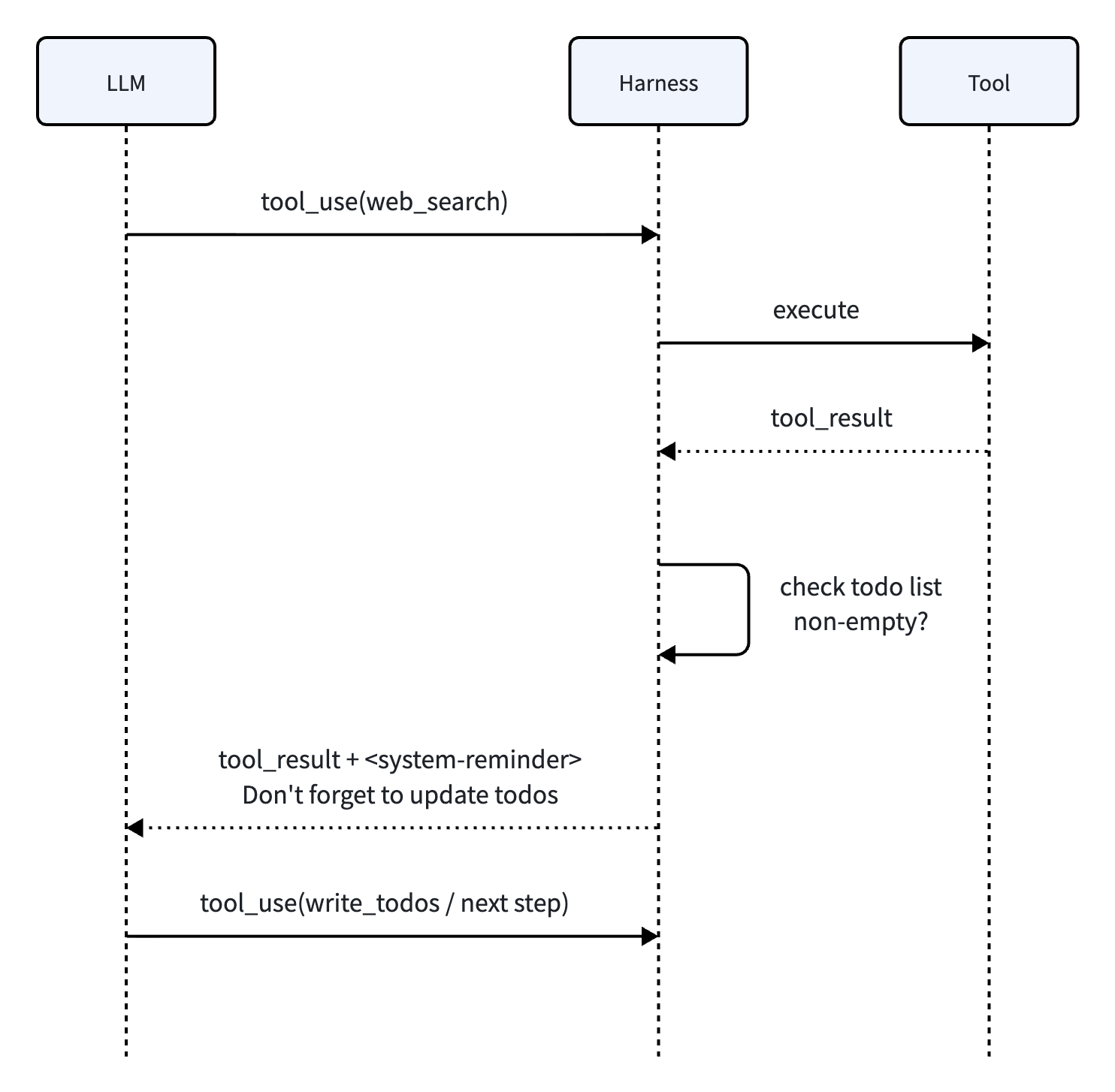
Two harness actions worth noticing: one, pass the tool_result back to the LLM as-is; two, when “current todo list is non-empty,” also append a system-reminder. Both arrive in the same message. From the model’s view, it looks as if the tool return came bundled with a built-in nudge.
And the nudge fires on every tool_result. Not just at the start, not every few rounds. As long as the plan isn’t done, it keeps firing. The model’s attention gets pulled back to “what’s my plan progress?” again and again, and the probability of forgetting to update drops sharply.
Patch A covers the input side of planning. Patch B covers the output side. Together with the write_todos tool itself, the harness for Deep Research is done — from single-turn ReAct, to multi-turn loop, to Plan-then-Act with two patches. That’s all of it.
But what does the same skeleton look like with a different toolset? That’s the crucial question we’ll answer in Part 3, where we cut to coding… then follow the loop until its tool results and capabilities no longer fit.